The best honeypot solutions in 2026: comparison and hands-on test results
2026 comparison of the best honeypot solutions: Trapster, Cowrie, OpenCanary, T-Pot. Real-world tests, pros, cons, and tips to help you choose.

A honeypot remains one of the most reliable security solutions for detecting an intrusion: it is a decoy system with no legitimate reason to be contacted, so any interaction with it is suspicious by definition. In 2026, the market for honeypot solutions has broadened between long-standing open-source projects, all-in-one commercial platforms, and newcomers betting on AI to make decoys harder to unmask.
This article reviews the main honeypot solutions on the market, then presents hands-on tests of four open-source tools: Trapster Community, OpenCanary, Cowrie, and T-Pot.
The criteria that actually matter
Before comparing the tools, here are the criteria we used:
- Decoy realism: a honeypot that an experienced attacker can easily spot loses most of its value.
- Protocol coverage: SSH and HTTP are no longer enough; a realistic internal network also exposes SMB, RDP, databases, LDAP, etc.
- Ease of deployment and onboarding: a good honeypot should be up and running in minutes, not days.
- Alert usability: log format, SIEM integrations, configuration clarity.
- Maintenance: project activity, update frequency, documentation quality.
CTI/research vs. production detection: two different logics
Before even comparing the tools, it's worth distinguishing two use cases that share neither the same goals nor the same success metrics.
A CTI (threat intelligence) or research-oriented honeypot aims to observe the threat landscape at scale rather than protect a specific network. It's typically exposed directly on a public IP, unrelated to any real information system, and its value comes from the volume and diversity of captured interactions: the more bots, automated campaigns, and varied scans it attracts, the richer the collected data. The notion of a false positive barely applies here, since no legitimate traffic is expected to reach that IP.
A detection/production-oriented honeypot, on the other hand, aims to spot as early as possible that an attacker has already entered a given internal network. It's deployed among real assets (admin VLAN, server segment), disguised to look like a legitimate company resource. Here, what matters is a false-positive rate close to zero and a reliable alert that triggers a genuine incident response, not a macro-level analysis of attack trends.
These two logics explain why some tools in this comparison, although placed side by side, don't address the same need at all.
Open-source honeypot solutions in 2026
Trapster Community
Trapster Community is a modern multi-service honeypot (SSH, FTP, HTTP/HTTPS, DNS, MySQL, MSSQL, LDAP, RDP, SNMP...) written in Python. It stands out for its ability to clone the look of real interfaces from a configuration file, and for dynamically generated responses that make fingerprinting harder. It's the open-source engine behind the commercial platform of the same name, Trapster (see the commercial platforms section further below). It's a honeypot built for production detection: deployed inside a real internal network, close to the assets it protects.
OpenCanary
Published by Thinkst, OpenCanary is a lightweight Python daemon that emulates around a dozen services (SMB, FTP, HTTP, MySQL, VNC...) with a minimal footprint. It installs quickly on a Raspberry Pi or a small VM and sends its alerts by email, webhook, or Syslog. Its emulations remain shallow, though. Like Trapster Community, it's a honeypot built for production detection rather than research: its goal is to act as a discreet tripwire inside an internal network, not to collect as much data as possible on the threat landscape.
T-Pot
Developed by Deutsche Telekom Security, T-Pot isn't a single honeypot but a distribution that bundles more than twenty of them (Cowrie, Dionaea, Conpot...) with an Elastic stack and ready-made dashboards. It's ideal for research on an internet-exposed IP, but resource-hungry (several GB of RAM) and better suited to observation than discreet internal detection. It's typically a CTI/research tool rather than a production detection one: its profile is too recognizable and its footprint too heavy to blend discreetly into a corporate network, but it's an excellent vantage point for observing the threat landscape on the internet.
Cowrie
The successor to Kippo, Cowrie remains the reference for trapping SSH and Telnet attacks. It emulates a full interactive shell: the attacker believes they gained access, their commands are logged, and any files they download are captured. Its main limitation is a narrow protocol scope and default artifacts that are fairly well known to experienced attackers. Cowrie fits both use cases depending on where it's placed: as a sensor exposed on the internet, it mainly serves to observe brute-force campaigns and botnets for research purposes; deployed and customized inside an internal network, it can also play a detection role, provided its default artifacts are reworked so a seasoned attacker doesn't recognize it.
Dionaea and Conpot
Two older projects that remain relevant in their niches: Dionaea captures malware spreading via SMB, FTP, or MSSQL, while Conpot emulates industrial systems (Modbus, S7comm, BACnet) for OT environments.
Commercial platforms
On the paid side, several product families coexist.
Trapster
Trapster focuses on internal detection at scale: automated deployment (including cloud, serverless, or multi-cloud environments, to detect lateral movement and unauthorized access), honeytokens, website cloning, ready-to-use templates, and direct forwarding to a SIEM, all hosted on European cloud infrastructure (OVHCloud), or on-premise.
Deployment effort stays very low since the honeypots are virtual machines that can be deployed in minutes and update themselves automatically, making it a natural choice for anyone who liked testing Trapster Community and wants to scale up without hiring a team dedicated to maintaining sensors.
Thinkst Canary
Thinkst Canary, the pioneer of the category, remains a reference for its simplicity: physical or virtual appliances, per-unit pricing, complemented by a canary-token service. Its "every alert is real" philosophy gives it a signal-to-noise ratio few competitors match, and its free Canarytokens service has democratized deception among teams that would never have deployed honeypots. We wrote a more detailed comparison between Trapster and Thinkst Canary here.
FortiDeceptor
FortiDeceptor is Fortinet's deception offering. It relies on decoys and lures/tokens placed on real endpoints and servers to redirect attackers toward fake assets and detect, as early as possible, the use of stolen credentials, lateral movement, MITM-style attacks, or ransomware. It can automatically isolate a compromised host, relies on SOAR playbooks, and integrates with SIEM, EDR, and the rest of the ecosystem. Pricing is per appliance (physical or virtual) and per VLAN (minimum two). It's a costly but consistent choice for organizations already standardized on Fortinet and for industrial environments, less so for a team simply looking for a lightweight sensor to deploy in minutes.
A market that has consolidated
Several historical pure players have been absorbed in recent years: Illusive Networks by Proofpoint, TrapX by Commvault, and Smokescreen by Zscaler, on top of Attivo by SentinelOne. In practice, the choice today comes down to a handful of families: targeted, low-noise appliances (Thinkst Canary), large enterprise platforms integrated into an ecosystem (FortiDeceptor, SentinelOne, Acalvio), threat-intelligence specialists (CounterCraft), self-operated open source, and cloud-native, sovereign, fast-to-deploy offerings like Trapster.
The trade-off stays roughly the same everywhere: the deeper the integration and support, the higher the bill, sometimes with strong lock-in to a single vendor.
Hands-on tests of 4 open-source honeypot solutions
Beyond the product sheets, four honeypot solutions accessible for a quick deployment were tested hands-on: Trapster, OpenCanary, Cowrie, and T-Pot.
Trapster Community
Strengths:
- Setup is genuinely simple thanks to Docker Compose: a few minutes are enough to get a working environment.
- Documentation is clear and easy to follow, a welcome change from open-source projects where you often have to guess the configuration.
- A configuration wizard is included, further lowering the barrier to a first deployment.
- Several log formats are available, including ECS, which lets you send logs to Elasticsearch without any intermediate transformation.
Demo:
Just clone the repo with git clone https://github.com/0xBallpoint/trapster-community.git, then run docker compose up --build inside it. If you'd rather not manage the infrastructure yourself, Trapster offers the same coverage as a managed service.
The honeypot starts up very quickly and logs are immediately accessible.
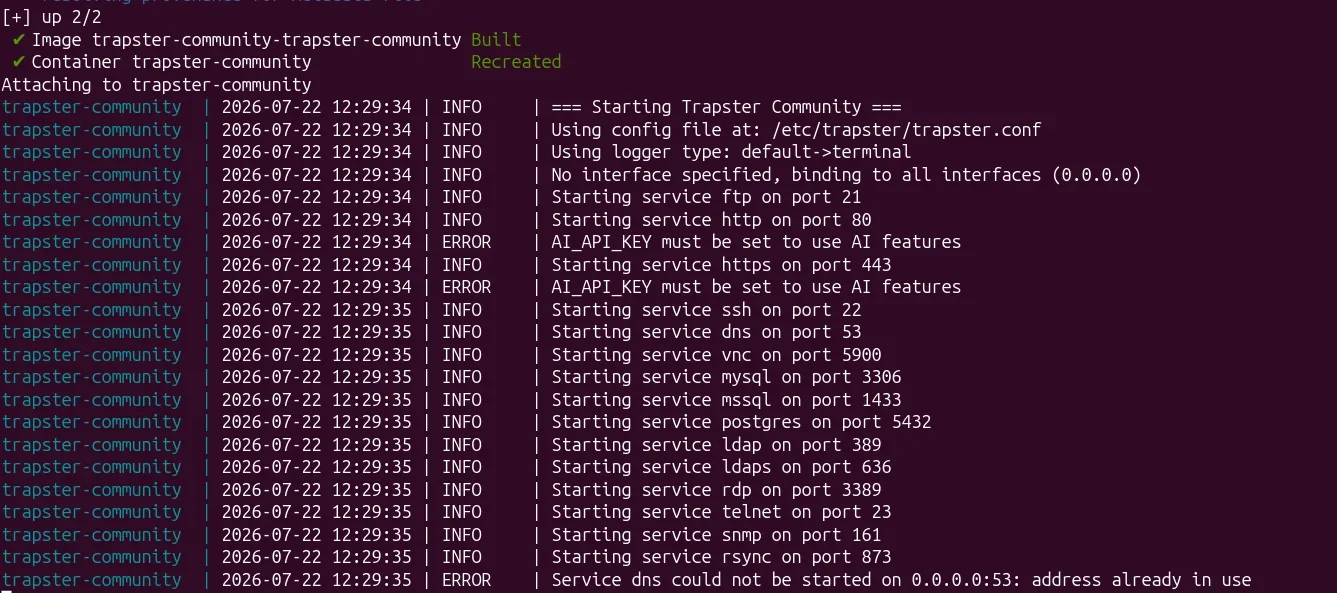
In the default configuration, all 15 detection modules are enabled. You can, for example, try to access the HTTP web server.
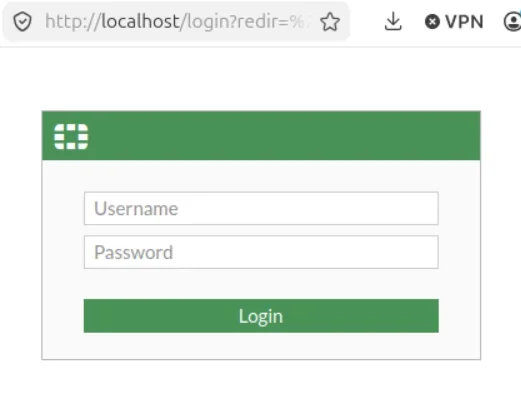

By default, the demo_api skin is configured, but the fortigate skin was tested here; four others exist, including demo_ia, which generates dynamic responses based on the routes called (for any tool that uses AI, you'll need to add a .env file, see the official documentation). You can of course create your own templates, in particular to clone an existing site by defining its routes and content in a simple YAML file.
On the configuration side, the big plus is the trapster-wizard.sh script, which helps build a custom configuration file.
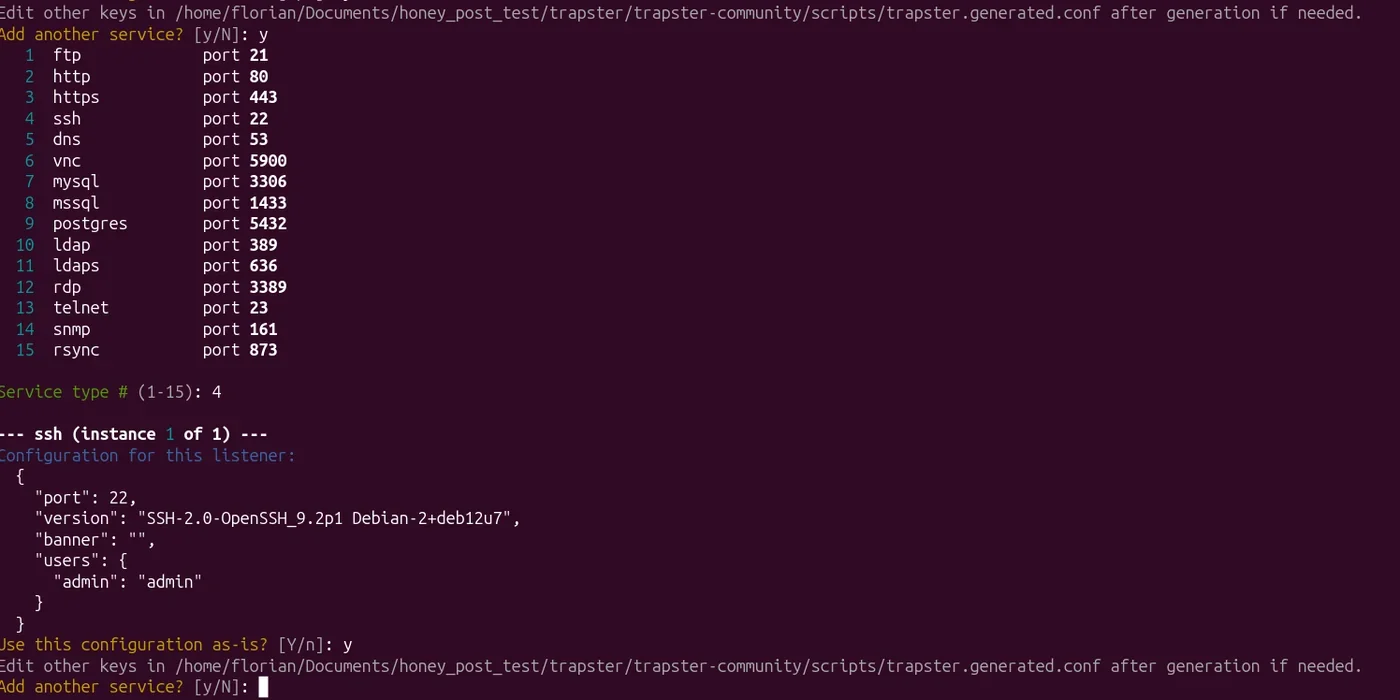
You then just need to copy the generated file into trapster-community/trapster/data/trapster.conf; the script even prints the exact command to run.
To observe how the SSH service behaves against this kind of reconnaissance, an nmap version scan (nmap -p 22 -sV) was also run against port 22.
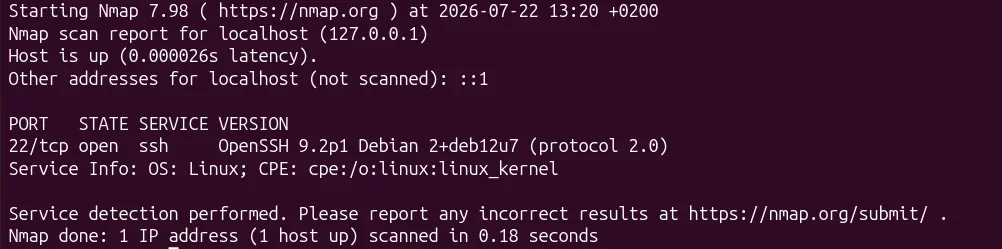
You can see that nmap correctly picks up the configured version (OpenSSH 9.2p1 Debian 2+deb12u7), and that, on the Trapster side, the scan was properly detected.

Overall, Trapster was the most pleasant solution to deploy and configure among the four tested, with a genuine effort to simplify the user experience. One thing to keep in mind: without the AI module enabled, the SSH shell remains mostly a proof of concept rather than a deep simulation. That fits Trapster's positioning as a low-to-medium interaction honeypot meant to detect an intrusion rather than hold the attacker with an ultra-realistic shell; the AI module is what later adds that level of realism.
OpenCanary
Strengths:
- Initial startup is fast.
- It offers quite a few configuration options once you understand how it works.
- Extremely lightweight on resources.
Demo:
Startup is similar to Trapster: clone the repo with git clone https://github.com/thinkst/opencanary.git, then run docker compose up --build on the stable branch.
In the default configuration, several modules are already active: FTP, HTTP, HTTPS, MongoDB, along with SYN scan and OS fingerprinting (nmap-style) detection.
Let's test an FTP connection, for example:
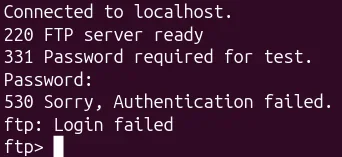

The connection is properly detected and logged, but with a log format that's less immediately usable than Trapster's: you need to spend a bit more time configuring the output (file, Syslog, webhook...) to get something directly usable in a SIEM.
This test nicely illustrates the philosophical difference between the two tools. OpenCanary is the open-source version of the commercial Thinkst Canary honeypot, designed from the ground up as a tripwire: the daemon implements several common network protocols and fires an alert as soon as an attacker interacts with one of them, without trying to hold or fool them for long. Trapster, by contrast, bets on more elaborate deception, with interface cloning and dynamically generated responses, to prolong the interaction and gather more information about the attacker's behavior.
An nmap test was also run against port 22, and this scan is also properly detected by OpenCanary.

OpenCanary remains a solid choice for anyone looking for a lightweight, quick-to-trigger sensor, at the cost of a less guided onboarding than Trapster: documentation sometimes lacks clarity on fine-tuning log configuration, which takes a bit more setup time than you'd expect from such a lightweight tool.
Cowrie
Strengths:
- Malware storage is built in, allowing later analysis.
- The emulated shell feels fairly realistic overall.
- Once set up, the tool is easy to use day to day.
Demo:
Cowrie's documentation doesn't ship an official docker-compose file, but a Docker image does exist. For convenience, a dedicated docker-compose file was put together:
services:
  cowrie:
    image: cowrie/cowrie:latest
    container_name: cowrie
    networks:
      - default
    restart: unless-stopped
    ports:
      - "22:2222"
    volumes:
      - cowrie_etc:/cowrie/cowrie-git/etc
      - cowrie_var:/cowrie/cowrie-git/var

volumes:
  cowrie_var:
  cowrie_etc:

networks:
  default:
    driver: bridge
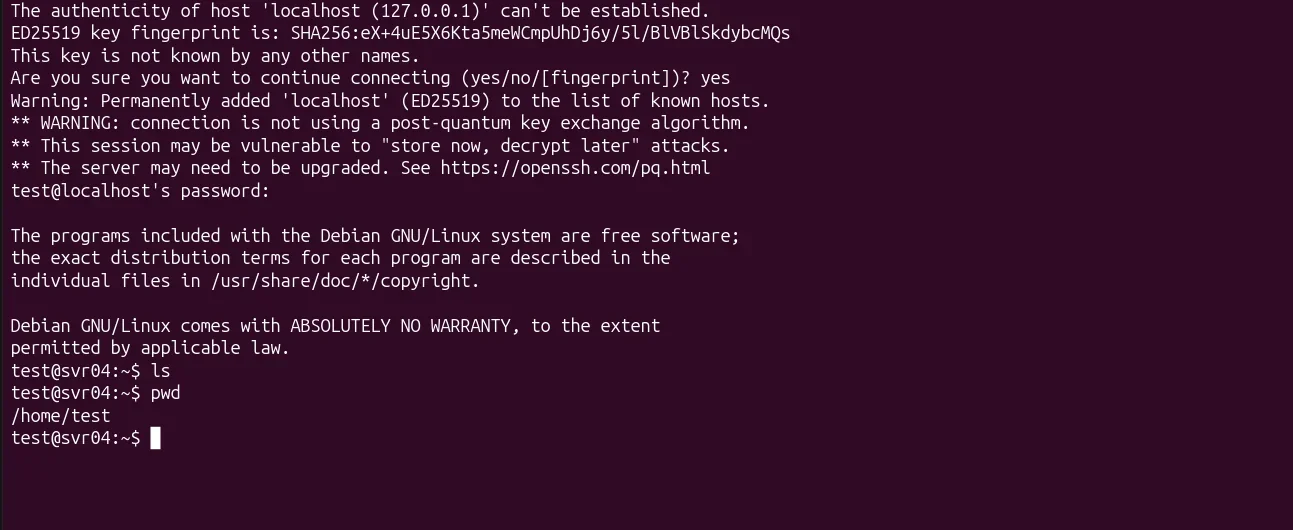
Once launched, an SSH connection is established:
The corresponding logs are captured:
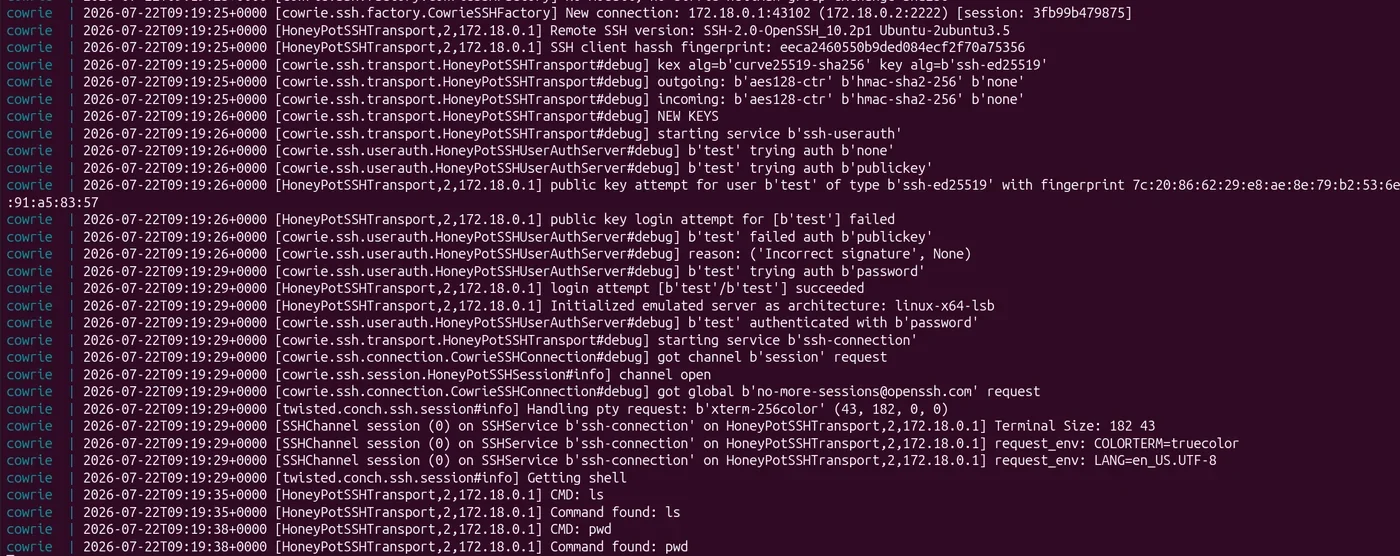
The shell is fairly well done, though a few details could tip off an attentive attacker that it's a trap: it doesn't handle wildcards, and system files can be deleted without any impact on how the shell keeps working. These aren't settings you can tweak in configuration: they stem from the architecture of Cowrie's "medium interaction" mode itself, which simulates a shell rather than exposing a real one. A rushed attacker likely won't notice a thing, but a more experienced one may spot these details if they take the time to probe the system's limits.
An nmap test (nmap -p 22 -sV) was also run against port 22, to see how Cowrie behaves against this kind of reconnaissance: the scan also returns a credible OpenSSH banner (OpenSSH 9.2p1 Debian 2+deb12u3), in the same vein as what was observed on Trapster, down to a patch-version detail.
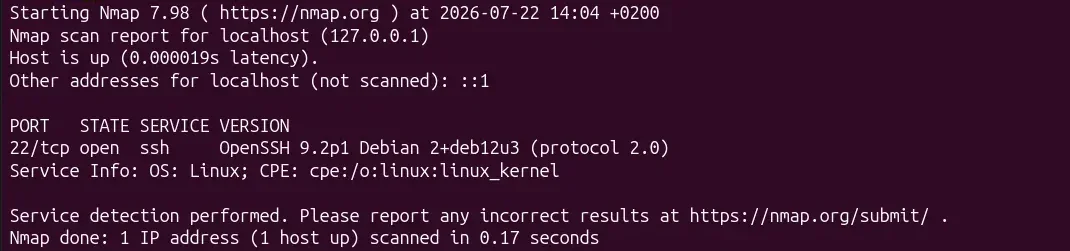

Cowrie remains a solid reference for observing SSH and Telnet attacks, with a convincing emulated shell and a real malware-capture mechanism for later analysis. For a CTI/research use case, on an exposed sensor, these details largely fade into the background compared to the volume of collected data; for a detection deployment on an internal network, they instead require real customization work before you can rely on it in production.
T-Pot
Strengths:
- Very broad protocol coverage thanks to the roughly twenty bundled honeypots (Cowrie, Dionaea, Conpot, Honeytrap...).
- Ready-made dashboards (Kibana, Elasticvue, Attack Map) that spare you from building your own visualization stack.
- A project actively maintained by Deutsche Telekom Security, with regular updates.
Demo:
Installing T-Pot is a bit more involved than the other three tools tested. It can be done on a dedicated machine or in a VM; the installation here was done on an AlmaLinux VM: just fetch and run the installation script detailed in the official documentation.
Once installation is complete, you can access the dashboard via https://<vm_ip>:64297.
You'll find several tools there, including Elasticvue and Kibana, which we'll use to monitor all the deployed honeypots.
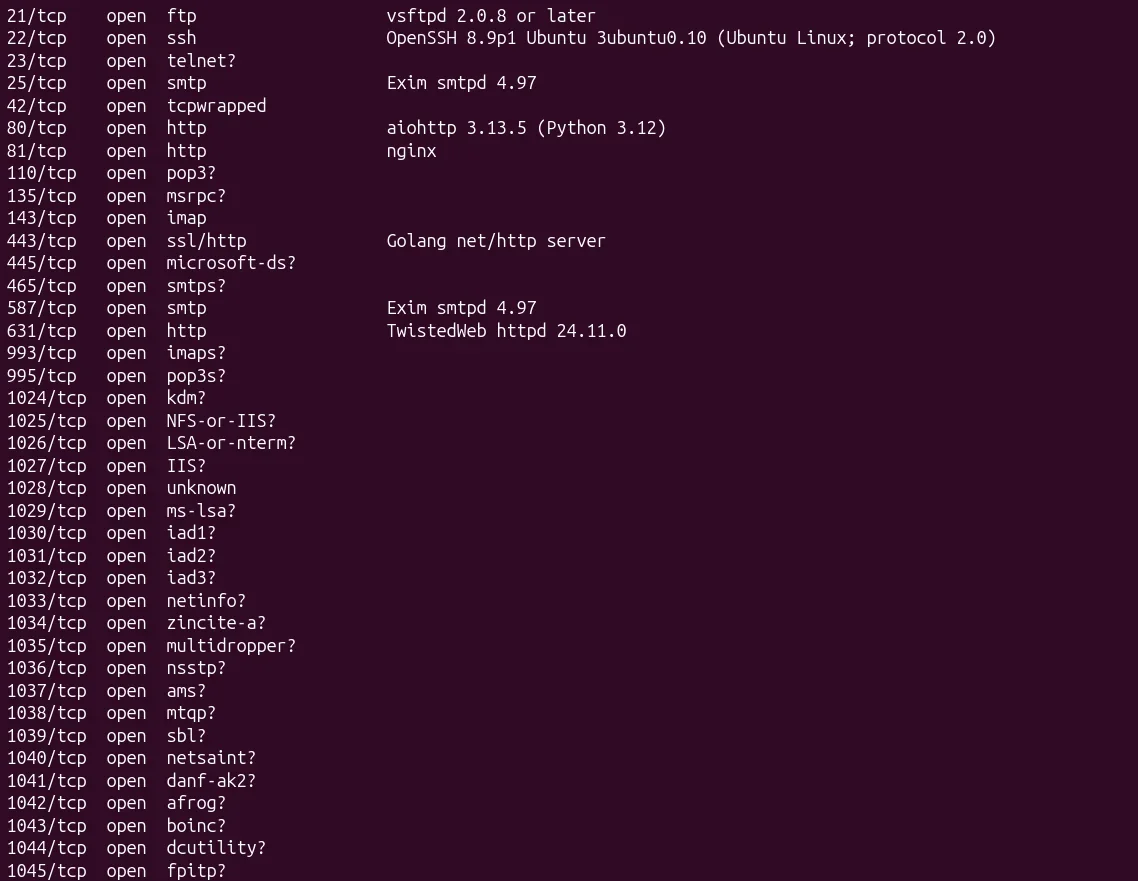
An nmap scan is then run against the VM to see which ports are open:
And here's what shows up on Kibana:
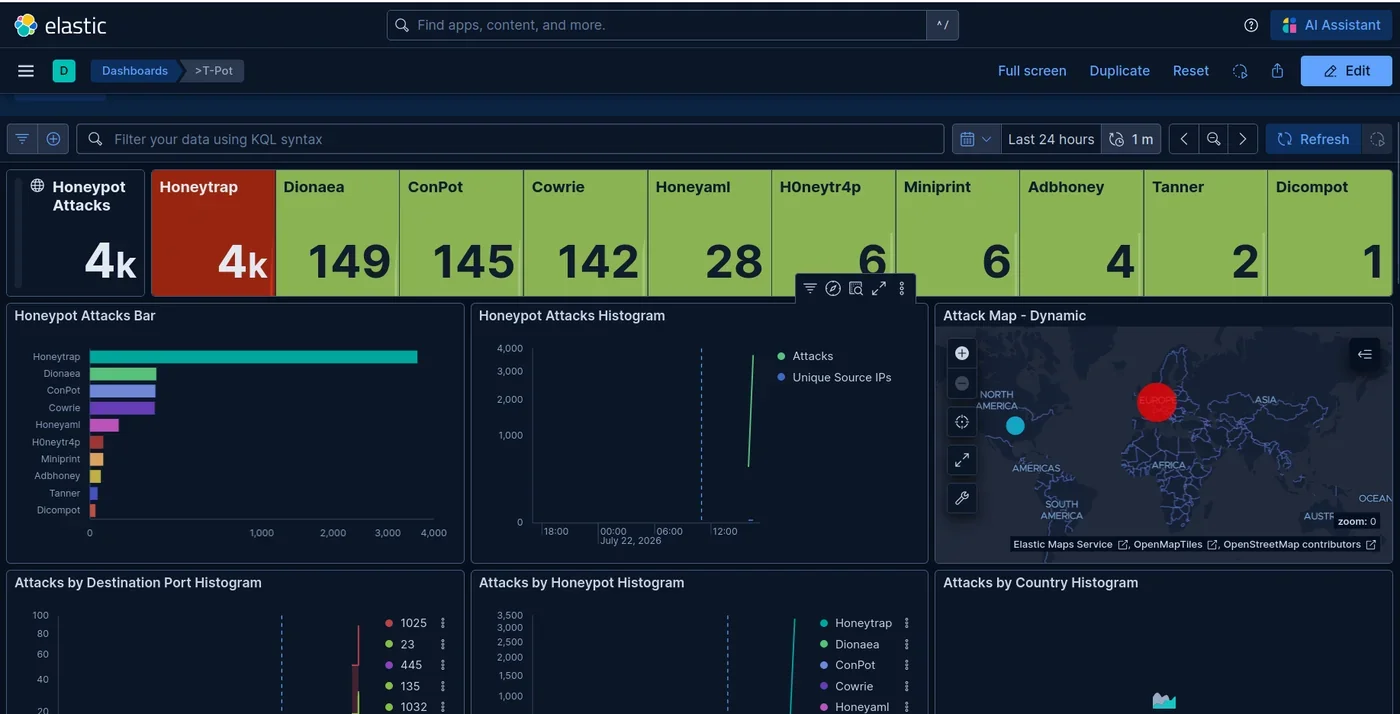
You immediately see the breakdown of attacks by honeypot type (Honeytrap and Dionaea account for most of the volume here), a real-time geographic map of attacks, and several histograms by destination port and country of origin. That's exactly what makes T-Pot strong: everything is ready to use, with no visualization stack to build yourself.
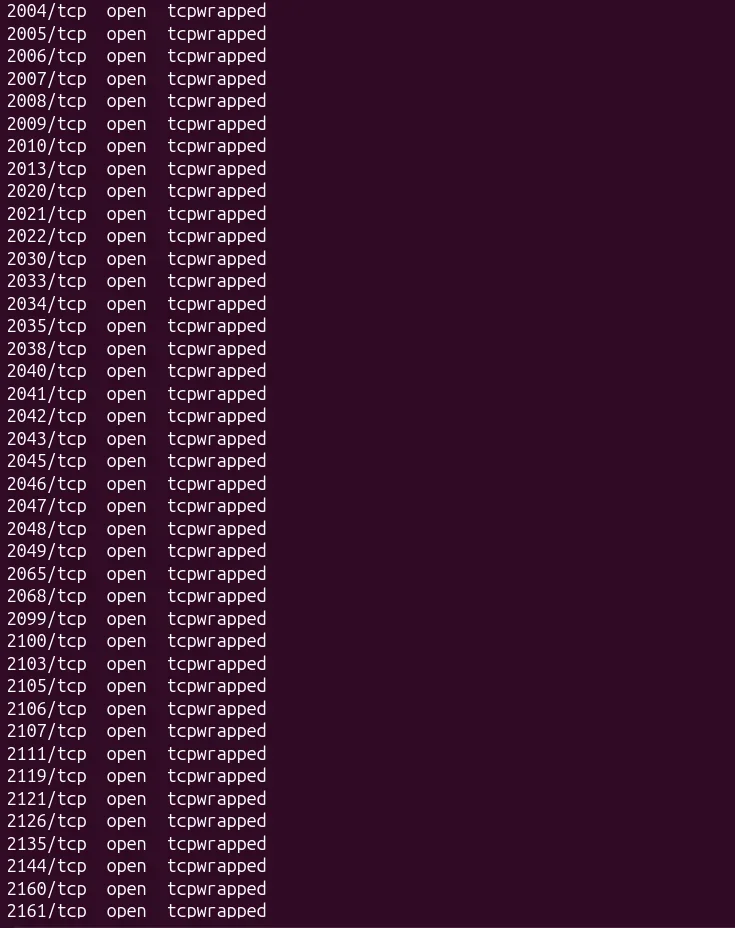
You also quickly notice, from the nmap scan, that every port on the machine is open (tcpwrapped), which removes any credibility for targeted internal detection: no production server has thousands of open ports like that. This confirms T-Pot's place: a tool built for research, meant to be deployed on a public IP to analyze scans and mass attacks, rather than to blend discreetly into a corporate network.
T-Pot delivers on its home turf: an installation somewhat heavier than the other three tools, but in exchange you get massive protocol coverage and complete Kibana dashboards, with no visualization setup of your own. This is clearly not a tool to deploy for internal detection, but it's an excellent observation post for anyone who wants to understand what's actually flowing across the internet.
Comparison table
| Solution | Type | Main use case | Services / decoys | Deployment effort |
|---|---|---|---|---|
| Trapster | Commercial | Detection at scale, SMB to MSSP | Multi-service + honeytokens + web cloning | Very low |
| Thinkst Canary | Commercial | Simple appliance-based alerting | Appliances + canary tokens | Very low |
| Acalvio ShadowPlex / CounterCraft | Commercial | SOC / MSSP, multi-tenant deployment | Large-scale orchestrated decoys + API/SIEM/SOAR | Medium |
| FortiDeceptor | Commercial | Fortinet environments | Integrated decoy suite | Medium |
| Trapster Community | Open source | Internal detection, realistic decoys, internet noise / CTI | SSH, HTTP, RDP, DB, LDAP... | Low |
| Cowrie | Open source | SSH/Telnet observation | SSH, Telnet | Low |
| T-Pot | Open source | Research, monitoring an exposed IP, internet noise / CTI | 20+ bundled honeypots | Medium to high |
| OpenCanary | Open source | Simple alerting, small budget | ~10 emulated services | Very low |
| Dionaea | Open source | Malware capture | SMB, FTP, MSSQL... | Medium |
| Conpot | Open source | Industrial environments (OT) | Modbus, S7, BACnet | Medium |
Which honeypot solution should you choose?
Your choice of honeypot solution depends above all on your needs. If you want to learn and experiment quickly, Trapster Community or Cowrie are great options, on a simple VM, in one evening. If you're after an ultra-lightweight deployment in a resource-constrained environment (Raspberry Pi, small VM...), OpenCanary is built for you, at the cost of a less intuitive log configuration. If your needs lean more toward research, with broad coverage on an internet-exposed IP, T-Pot is built for you, provided you have enough RAM.
If you want to scale up after testing Trapster Community, without managing the infrastructure yourself, Trapster offers exactly that: automated deployment, ready-to-use templates, and European hosting. That's precisely Trapster's core target: an SMB without a dedicated SOC that wants directly actionable alerts, without deep in-house expertise. Finally, if you're a SOC or an MSSP managing many endpoints, you'll instead need a platform with an API, SIEM/SOAR integrations, and multi-tenant management of decoys and honeytokens.
Where to start
- Deploy a first decoy on the most sensitive network segment (critical servers, admin VLAN).
- Wire the alerts to a channel someone actually monitors daily: SIEM, Slack, on-call email.
- Check that it works: run an nmap scan from an internal workstation and confirm the alert comes through.
- Gradually extend coverage segment by segment, then add honeytokens to also cover workstations.
For anyone who wants to see what a complete platform looks like rather than a homemade open-source deployment, book a 30-minute demo on our site: we'll set up a test environment with you.
Frequently asked questions
What is the best honeypot solution? It depends on whether you want to self-operate a sensor or run a managed platform. For a self-hosted deployment, Trapster Community offers the broadest protocol coverage with realistic decoys among the open-source options tested here. For teams that want automated deployment, honeytokens, website cloning, and direct SIEM forwarding without maintaining the infrastructure themselves, Trapster is built for exactly that; check our pricing for details.
What is the best open-source honeypot? It depends on your need: for broad intrusion detection on an internal network, Trapster Community offers the widest protocol coverage with realistic decoys. To focus on SSH attacks, Cowrie remains the historical reference. For research on an internet-exposed IP, T-Pot bundles most of the open-source ecosystem into a single distribution.
Is a free honeypot enough for a company? To validate the concept on a given segment, largely yes. But at scale, with several segments to cover, honeytokens to manage, alerts to centralize to a SOC, and realism to maintain over time, the real total cost of ownership of an open-source solution often ends up exceeding that of a managed platform.
Does a honeypot replace an EDR or an IDS? No, it complements them. An EDR covers endpoints running an agent, an IDS analyzes traffic by signatures; a honeypot, meanwhile, detects what slips past both: lateral movement, machines without an agent installed, with a false-positive rate close to zero since no legitimate interaction is expected to occur there. Our complete honeypot definition details this complementarity.
How much does a honeypot cost? From zero, by self-hosting an open-source solution, to several thousand euros a year for an enterprise platform with support, depending on the number of decoys deployed and the integrations you need. Check our pricing for a concrete order of magnitude.